Which roles a construction org chart shows, and why
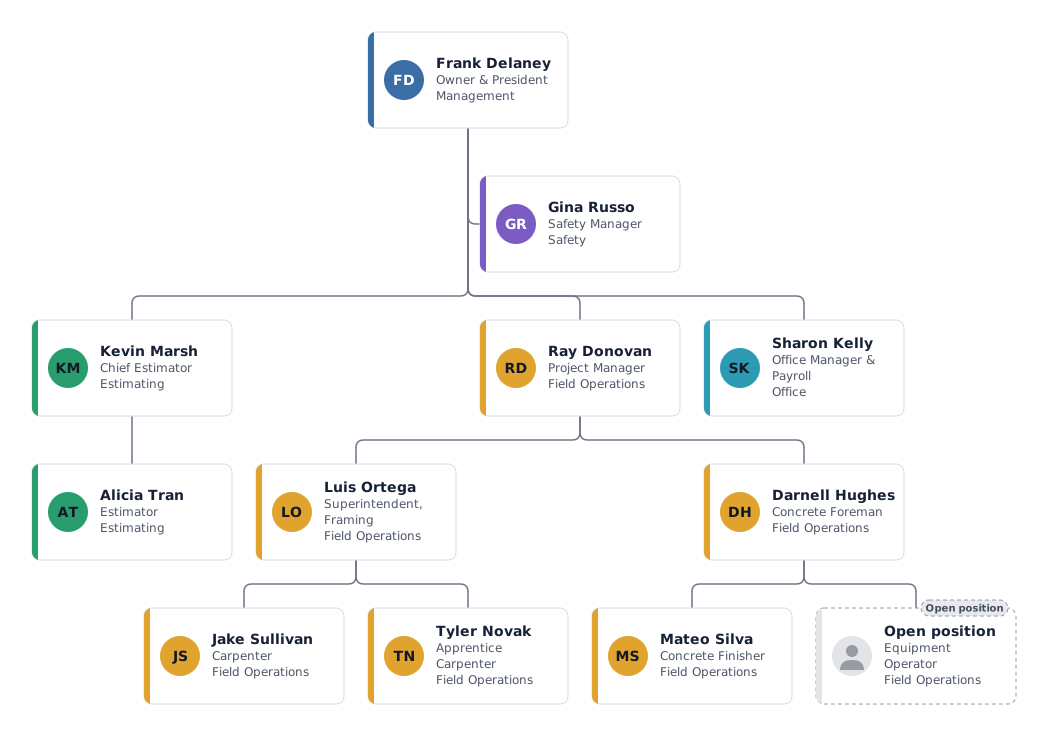
A construction company has a small office and most of its people on site. The chart shows the path from the job site to the decision maker, which matters for safety, for owners who ask who runs their project, and for new hires.
- Owner and president
- Wins key clients, signs contracts and carries the risk. In a family business the owner often still estimates large jobs; write that into the title rather than adding a box.
- Safety manager
- A staff position beside the owner: the safety manager can stop work on any site but does not lead the crews. Many smaller firms use a part-time or contracted safety professional, shown here at 0.5 FTE.
- Chief estimator and estimator
- Takeoffs, pricing and bids. Estimating reports to the owner because it commits the company to a price.
- Project manager, superintendent and foremen
- The project manager owns schedule, budget and client contact. The superintendent runs the site day to day, and each foreman leads a crew. On smaller jobs one person may do both PM and superintendent work.
- Crews and office
- Carpenters, finishers, operators and apprentices make up the crews. The office manager handles payroll, invoices and certificates of insurance, which keeps the field paid and compliant.
Variations: small trade contractor or growing GC
Small trade contractor
Owner, one or two foremen and their crews, plus an office manager. Estimating is done by the owner; delete the estimating department and note it in the owner's title.
Growing general contractor
Add a second project manager per region or market, a superintendent per active job and a preconstruction lead. Give each project manager's group its own colour so jobs read separately.
Tips for a construction company org chart
Attach the chart to your site safety plan
Export the site team as a PDF for the safety binder, so everyone on site knows who the competent person and the first contact are.
Show open positions for the next job
Mark the operator or carpenter you still need as an open position. The headcount overview shows open positions per department next to your filled roles.
Track subcontractors separately
Put subcontractor leads in their own department with a neutral colour, or add a custom field with the company name, so they are not confused with your employees.
Questions about this template
Is the superintendent above or below the project manager?
In most companies the superintendent reports to the project manager, as in this template. Some firms make them peers who both report to an operations director; then move the superintendent up one level.
Should I include every crew member?
For an internal chart, yes, if it stays readable. For bids and client presentations, show leads only and summarise crews in the foreman's box.
Can I make one chart per job?
Yes. Duplicate a chart or start from this template for each project, keep the office roles and change the site team. Each chart can be exported separately.
Ready to put in your own names?
The template opens in the editor with the example people. Replace them by hand, or import your staff list and keep the structure.