Which roles a nonprofit org chart shows, and why
A nonprofit has two lines of responsibility: the board governs and the staff manage. The chart makes that boundary visible, which helps new board members, staff and funders.
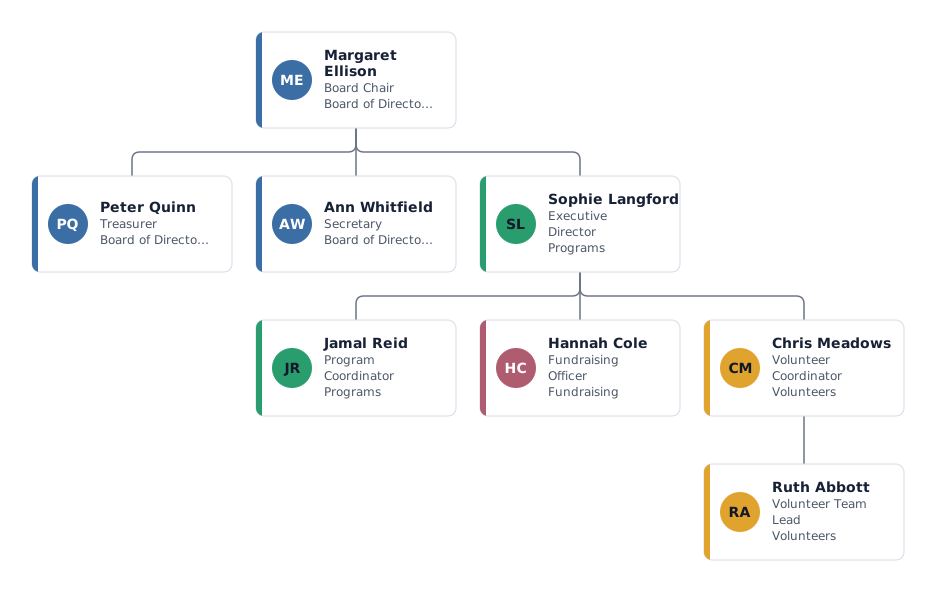
- Board Chair, Treasurer and Secretary
- The officers of the board. The chair leads board meetings, the treasurer oversees finances and reports to the board, and the secretary keeps minutes and records. Their exact duties come from your bylaws.
- Executive Director
- Hired by the board and reports to it, usually through the chair. The director manages all staff and volunteers. Staff report to the director, not to individual board members.
- Program Coordinator and Fundraising Officer
- Programs deliver your mission; fundraising secures grants and donations to pay for them. Both report to the executive director, who balances the two.
- Volunteer Coordinator and volunteer team lead
- Recruits, trains and schedules volunteers. Showing a volunteer team lead makes it clear that volunteers also have someone to go to.
Variations: all-volunteer group or staffed charity
All-volunteer organization
Without paid staff the board does the work. Delete the executive director and put committees (events, membership, outreach) directly under the chair, each led by a board member.
Larger nonprofit with several programs
Add a deputy or operations director, one manager per program, and a finance or HR function under the director. Committees of the board can sit beside the officers with a separate colour.
Tips for a nonprofit org chart
Separate volunteers from staff by colour
Use departments for board, staff and volunteers. Each department has its own colour, so readers see the difference at a glance.
Show the board-to-director link clearly
Keep the executive director as the only staff role under the board. If the treasurer works closely with the finance staff, add a dotted line instead of a second manager.
Show open board seats and vacancies
Mark a box as an open position for a vacant board seat or a role you are recruiting for. It is a useful slide for your annual meeting.
Track part-time and grant-funded posts
Enter working time as FTE and add a custom field such as "funded by" to see which posts depend on which grant.
Questions about this template
Does the executive director sit on the board?
It depends on your bylaws. Many nonprofits make the director a non-voting member or invite them to meetings. On the chart, the director usually appears below the board as its one direct report.
Should volunteers be on the org chart?
Show volunteer roles and the people who lead them. For large volunteer groups, a box per team is clearer than listing every name.
How do I show board committees?
Add each committee as a box under the chair with the committee chair's name, and give committees their own department colour.
Is a nonprofit org chart required for grant applications?
Some funders ask for one. Export a PDF of the chart and update it when your staffing changes, so the version you send is current.
Ready to put in your own names?
The template opens in the editor with the example people. Replace them by hand, or import your staff list and keep the structure.