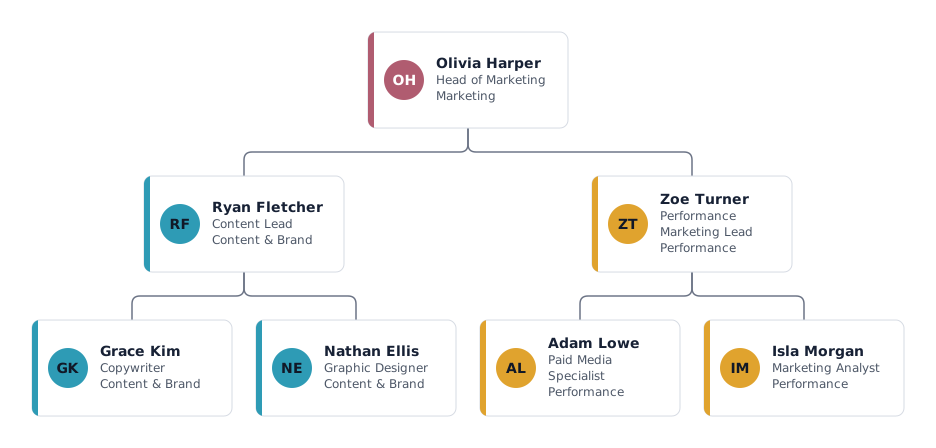
Which roles a department org chart shows, and why
A department chart is for the people inside the team and the colleagues who work with it. It shows who leads which area and whom to ask for what, without the rest of the company.
- Head of Marketing
- Leads the department, owns the budget and reports to someone outside this chart, such as the CEO. Write that link in the title or a custom field if readers need it.
- Content Lead with copywriter and designer
- A team lead runs the day-to-day work of a small group and usually still does hands-on work. Grouping by specialism keeps the chart readable.
- Performance Marketing Lead with specialist and analyst
- The second team covers paid campaigns and analysis. Two teams of two or three people under one head is a span that one manager can lead well.
Variations: a small team or a department with several teams
One lead and a few specialists
Remove the team leads and put everyone directly under the head. Use departments only if people really belong to different areas.
Department with several teams and locations
Add a team lead per team or per site and use the list or grid layout when the chart gets wide. Export just one team as a separate file when you need it.
Tips for a department org chart
Show the department assistant beside the head
Mark a team assistant as an assistant so they appear beside the head of department, as a staff position.
Show people from other departments with a dotted line
If an analyst works for marketing but reports to finance, add the person with a dotted line to the marketing lead.
Show open positions and planned FTE
Mark vacancies and enter working time; the headcount overview shows people, open positions and FTE per department for your planning.
Cut it out of the company chart
If you already have the full company chart, export one department or team on its own instead of building a second chart.
Questions about this template
Can I use this template for HR, IT or finance?
Yes. Rename the department and the teams, change the titles and keep the structure, or add and delete boxes as needed.
How do I show who the head of department reports to?
Add the manager above the head as a single box in a neutral colour, or note it in the head's title so the chart stays focused on the department.
How do I keep the department chart in line with the company chart?
Build one company chart and export one department or team from it, so both always show the same data.
Ready to put in your own names?
The template opens in the editor with the example people. Replace them by hand, or import your staff list and keep the structure.