Which roles a project org chart shows, and why
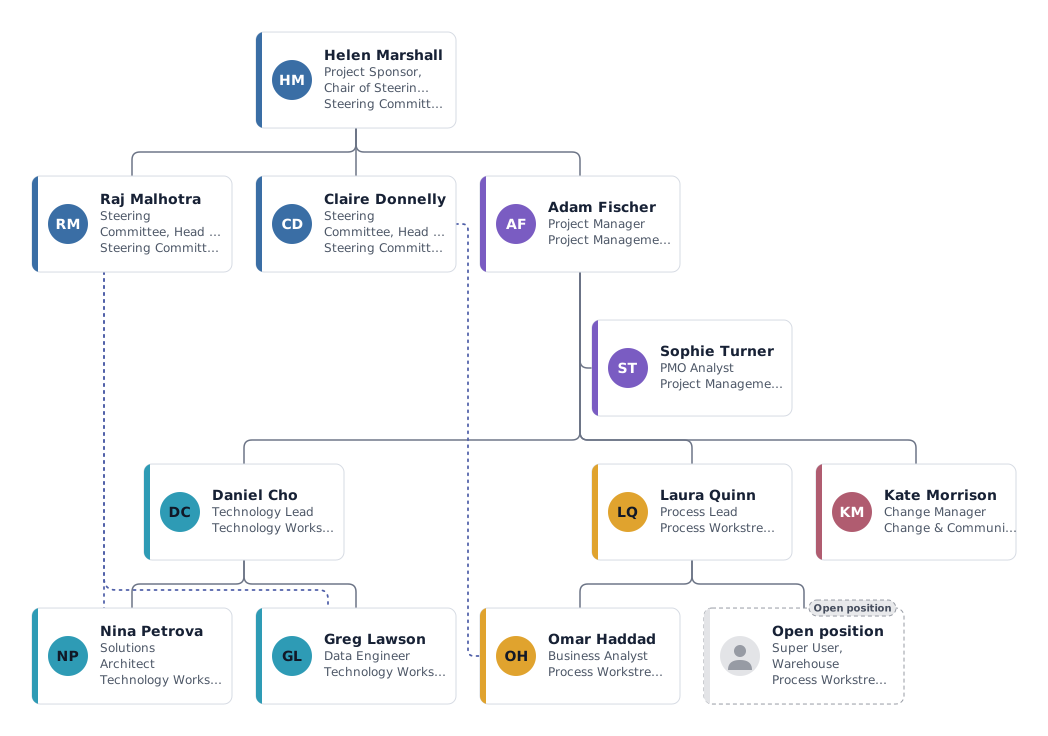
A project chart is not a second company chart. It shows who decides, who runs the project, who works on which workstream, and where each person's home department is, because that is where most conflicts about time and priorities come from.
- Project sponsor and steering committee
- The sponsor owns the business case and chairs the steering committee, which approves scope, budget and major changes. Members are usually heads of the departments that supply people or are affected by the result.
- Project manager and PMO
- The project manager plans, coordinates and reports to the steering committee. The PMO analyst sits beside the project manager as a staff position, keeping the plan, risks and reporting up to date.
- Workstream leads
- Each workstream (here technology and process) has a lead who organises the work of a few specialists. Leads report to the project manager for project work.
- Team members with dotted lines
- Team members stay employed in their departments. The dotted line from each member to their line manager on the steering committee shows who approves their time and holidays. One data engineer works half time (0.5 FTE) on the project.
- Change and communications
- Training, communication and adoption, often part-time. The super user role is still open, which is a common risk worth showing.
Variations: small project or programme
Small project
Sponsor, project manager and four to six team members, no workstreams or PMO. Keep the dotted lines to line managers; they matter just as much in a small team.
Programme with several projects
Put a programme manager under the steering committee and one project manager per project below, each with its own colour. A shared PMO sits beside the programme manager.
Tips for a project org chart
Put the chart in the project charter
Export a PDF or PNG for the charter and the kick-off deck, so everyone signs off on the same roles. PowerPoint export is available in the paid plans.
Track allocation with FTE
Enter each person's share of time on the project as FTE. The headcount overview adds it up per workstream, which shows quickly if the plan is realistic.
Show unfilled roles as open positions
Mark missing roles as open positions. An open super user or tester is a risk the steering committee should see.
Questions about this template
What is the difference between a project org chart and the company org chart?
The company chart shows permanent reporting lines. The project chart shows temporary roles for one project and links back to the line organization with dotted lines.
Does the project manager sit on the steering committee?
Usually the project manager attends and reports to it but does not vote. That is why the template places the project manager under the sponsor rather than inside the committee.
How do I show external consultants or vendors?
Add them in their own department with a neutral colour, or note the company in a custom field. Keep their line to the workstream lead they work for.
Ready to put in your own names?
The template opens in the editor with the example people. Replace them by hand, or import your staff list and keep the structure.