Which roles a practice org chart shows, and why
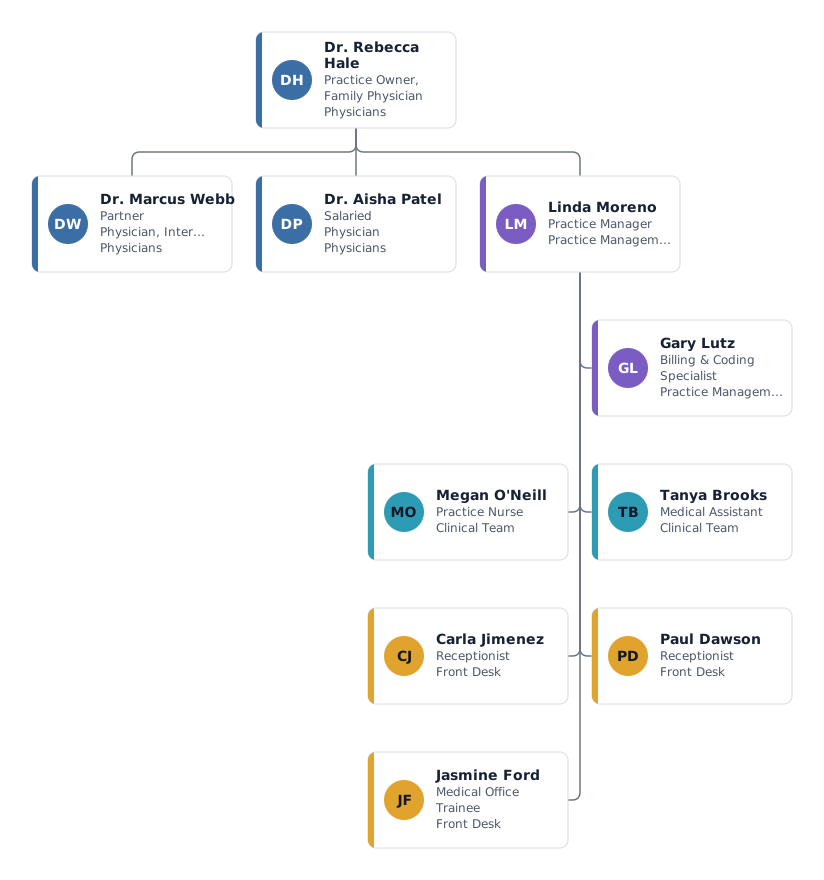
In a practice, clinical decisions sit with the physicians while the daily running of the office sits with the practice manager. A good chart keeps both lines visible, so staff know whom to ask about a patient and whom to ask about the rota.
- Practice owner and partner physician
- The owner holds the practice and is ultimately responsible for staff and finances. In a partnership the partners share that role; the template puts the partner one level down, but you can also make both physicians top-level boxes if they are equal owners.
- Salaried physician
- An employed doctor sees patients but does not own the practice. The template shows a half-time post (0.5 FTE), which is common for doctors who also work in a hospital or clinic.
- Practice manager
- Runs scheduling, supplies, HR paperwork and compliance, and leads the non-physician staff. Nurses and front desk report here for day-to-day matters, while clinical direction still comes from the physicians.
- Billing and coding specialist
- Shown as a staff position beside the practice manager: the role supports the whole practice without leading anyone. Many practices outsource billing; then keep the box and note the provider in the title.
- Nurse, medical assistant, receptionists and trainee
- The clinical team takes vitals, gives injections and assists with procedures; the front desk handles check-in, phones and referrals. Part-time hours are entered as FTE, so the chart doubles as a simple staffing plan.
Variations: solo practice or multi-site group
Solo physician with three to five staff
Keep one physician at the top and put the staff directly underneath. The physician often acts as practice manager too; note that in the title instead of adding a box nobody fills.
Group practice with several sites
Add a lead physician and an office lead per site, and give each site its own department colour. A shared billing or HR team can sit under the practice manager as a separate department.
Tips for a medical practice org chart
Make part-time staff visible
Enter each person's FTE. The headcount overview adds up people and FTE per department, which helps when you plan cover for holidays.
Show a nurse who reports to a doctor with a dotted line
If a nurse takes clinical direction from one physician but HR matters from the practice manager, keep the manager as the line and add the physician as a dotted line.
Plan the next hire as an open position
Mark a box as an open position for the receptionist or assistant you are recruiting, so everyone sees the gap the team is covering.
Keep it current from your staff list
Export your staff list to Excel or CSV and import it again after changes. You see who is new or has left before you apply the update.
Questions about this template
Should patients ever see the practice org chart?
Usually not the full chart, but a simple version with names and roles works well on your website or in the waiting room. Export it as a PNG or PDF and leave out internal details.
Who should the practice manager report to?
To the owner, or to the partners jointly. If one partner handles management questions, make that partner the manager's line and add a dotted line to the others if that helps.
How do I show locum or visiting doctors?
Add them under the owner with their FTE and a custom field such as "contract: locum", or put them in their own department so they stand out from permanent staff.
Ready to put in your own names?
The template opens in the editor with the example people. Replace them by hand, or import your staff list and keep the structure.