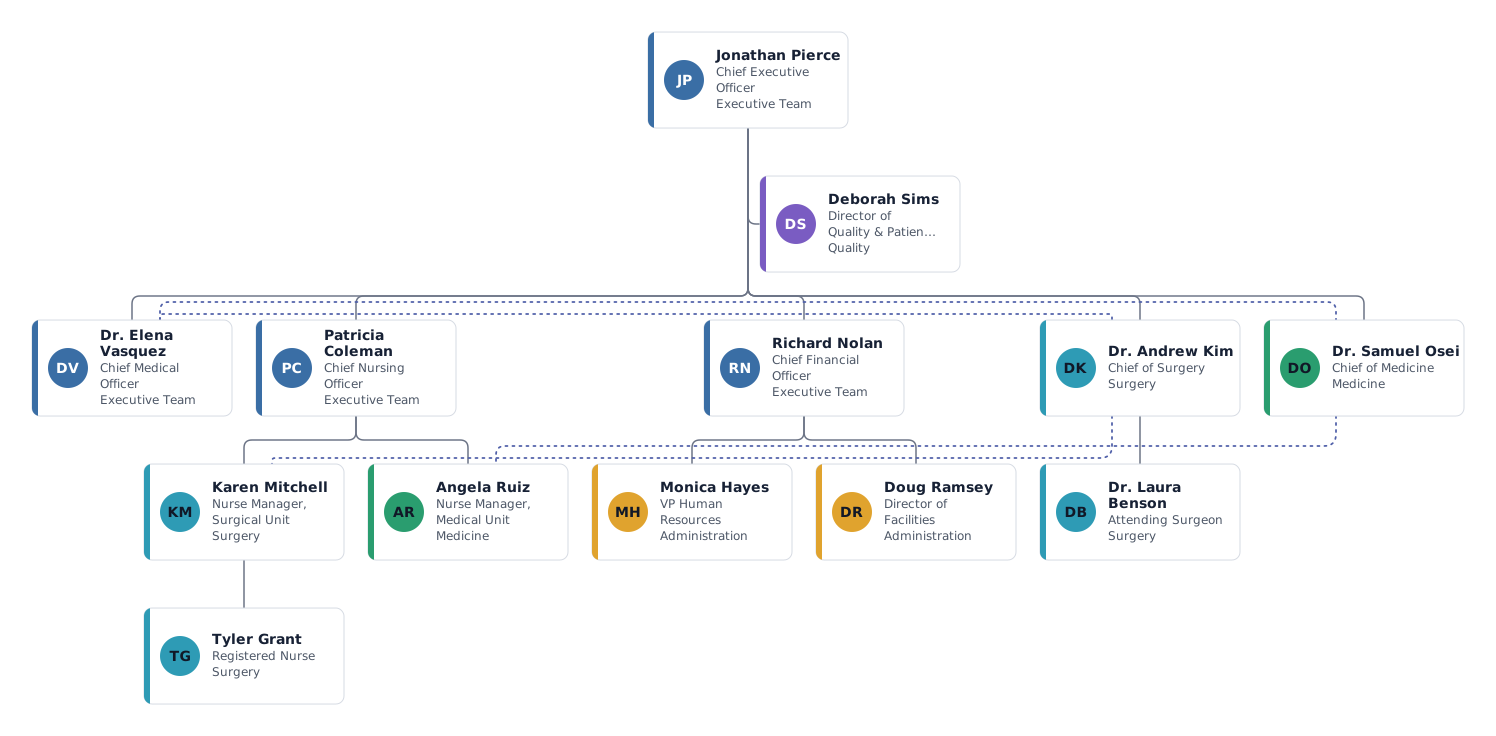
Which roles a hospital org chart shows, and why
A hospital chart has to answer two questions: who is accountable for clinical care in each area, and who manages the people who deliver it. Most hospitals answer them with a medical line and a nursing line that meet on the units.
- CEO and executive team
- The CEO runs the hospital for the board or health system. The chief medical officer, chief nursing officer and chief financial officer form the core executive team; larger hospitals add a COO, CIO or chief quality officer.
- Director of Quality and Patient Safety
- Placed beside the CEO as a staff position: the role audits, reports and advises across every department but manages no clinical staff. This is exactly what the staff position feature is for.
- Chiefs of surgery and medicine
- Department chiefs lead the physicians in their service line. They report to the CEO for operations and budget, with a dotted line to the CMO for clinical standards. Your hospital may route them through the CMO instead; move the line if so.
- Nurse managers and nurses
- Unit nurse managers report up the nursing line to the CNO, and work daily with the clinical chief of their unit, shown as a dotted line. The registered nurse in the template works 0.8 FTE.
- HR and facilities
- Support services usually sit under the CFO or a COO. Add pharmacy, IT, patient access or materials management the same way, each as its own department.
Variations: community hospital or health system
Small community or critical access hospital
Keep the CEO, a chief of staff or CMO, the CNO and a finance lead. Put departments such as emergency, inpatient, lab and imaging directly under the CNO or the chief of staff, without a separate chief per specialty.
Hospital within a health system
Add the system executive above the hospital CEO in a neutral colour, and build one chart per department instead of one huge chart. Each department chart can be exported on its own.
Tips for a hospital org chart
Use department colours for service lines
Give surgery, medicine and administration their own colours. Nurse managers take the colour of their unit, so the clinical areas read clearly across both lines.
Draw matrix relationships with dotted lines
Each person keeps one solid line for their manager. Use dotted lines for clinical or functional reporting rather than drawing two managers.
Keep large charts readable
Past a few dozen people, switch to the list or grid layout, collapse branches, or export one department or team as its own PDF.
Start from your HR export
Import an Excel or CSV export with name, title, manager and department. On the next import you see the changes before you apply them.
Questions about this template
Do department chiefs report to the CMO or to the CEO?
Both models are common. Where chiefs are employed by the hospital they often report to the CMO; where the medical staff is self-governing, the line runs to the CEO with a dotted line to the CMO. Draw the one your bylaws describe.
How do I show the medical staff and the board?
Add the board as a separate box above the CEO in a neutral colour. The organized medical staff can be a separate top-level box with a dotted line to the CMO, so it does not look like part of the management line.
Can one chart hold the whole hospital?
The free plan covers up to 25 people per chart, which suits an executive or department chart. For the full hospital, build one chart per department and link them in your intranet.
Can I export the chart for accreditation documents?
Yes. Export PNG, SVG, PDF or CSV. Print-ready PDF in large formats and PowerPoint export are part of the paid plans.
Ready to put in your own names?
The template opens in the editor with the example people. Replace them by hand, or import your staff list and keep the structure.